Rob Jones – Complete Guide to Maschine Mk3 (Download)
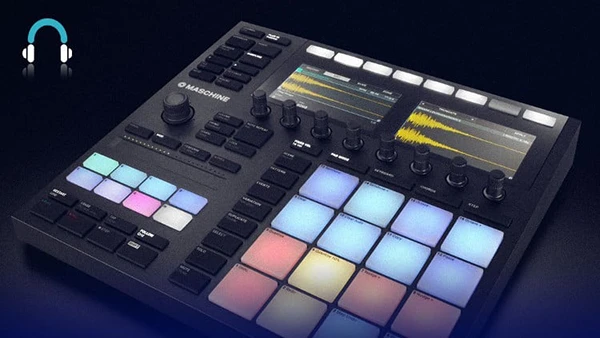
Native Instruments’ Maschine MK3 represents one of the most powerful hardware-software combinations for music production, yet many producers struggle to unlock its full potential. The deep integration between controller and software, combined with extensive routing options, sampling capabilities, and performance features, can overwhelm newcomers who see only surface-level beat-making when the platform offers complete production power.
About the Course and Instructor
Complete Guide to Maschine Mk3 is taught by Rob Jones, a certified Maschine trainer who provides over four hours of comprehensive instruction covering every aspect of the MK3 controller and software. This course transforms you from beginner to proficient user, teaching production techniques across multiple musical styles while mastering both creative and technical aspects of the platform.
What You’ll Learn
This complete training covers Maschine MK3 from fundamentals to advanced techniques:
Pattern Creation Mastery
Create patterns using pad mode with detailed instruction across multiple methods. Work in the software pattern editor, then progress through hardware pattern editing using Events and Step modes for hands-on workflow.
Soundslot Management
Build drum kits from scratch, add and edit breaks, work within the Sampler to edit soundslots, and integrate bass elements to complete full production kits.
Advanced Pattern Modes
Master Step Mode for precise programming, utilize Keyboard and Chords modes for melodic content, and explore 16-Velocity mode for dynamic performance expression.
Scene and Section Organization
Structure your productions using Scene mode for arrangement building, Section mode for song organization, and understand Unique and Auto-Length features for efficient workflow.
Sampling Techniques
Record oneshot samples, capture and edit loops, slice samples for creative manipulation, and stretch samples to fit your project’s tempo and timing.
Effects Processing
Navigate Maschine’s complete effects library with detailed guidance, add and edit effects directly from the MK3 hardware, and understand when and how to apply each processor type.
Synthesis Tools
Explore Drum Synth for creating custom percussion sounds and Bass Synth for building powerful low-end elements from scratch.
You may also be interested in these courses:
- Music + Audio Production in Logic Pro X – The Complete Guide (Download)
- Ben Hewlett – Learn to play HARMONICA, the easiest instrument to pick up! (Download)
Advanced Routing and Modulation
Modulate parameters directly from MK3 hardware, apply envelope and LFO modulation for movement, use Step Mode modulation for pattern-based changes, configure send effects for parallel processing, and implement sidechaining for dynamic mix control.
Performance Features
Create and use macros for quick parameter control, save Lock Snapshots for instant recall, utilize Smart Strip for expressive performance, and apply Perform FX for live manipulation.
DAW Integration
Learn to use Maschine as a plugin within DAWs like Ableton Live and Logic Pro, expanding your production capabilities.
The course includes written notes, Maschine project files, and 250MB of bonus samples for immediate hands-on practice.
Who Should Take This Course
This training serves budding producers new to Maschine, beginners wanting structured learning, beat-makers ready to expand into complete production, and anyone seeking to maximize their Maschine MK3 investment through certified instruction.